New changes to network color printers on fourth floor at International Square
Configuration changes have been implemented on the following color printers on the fourth floor of International Square.
| Printer | Section Area | Room Number | Model |
|---|---|---|---|
| MGTPRT59 | LEU | Outside I-4312 | HP 5525xh Color |
| MGTPRT58 | Personnel Security | I-4147 | HP 5525xh Color |
| MGTPRT02 | Director's area | Outside I-4154 | HP 5525xh Color |
| SSPRT23 | B&A area | Outside I-4331 | HP 5525xh Color |
By default, all print jobs sent to those printers are printed in black and white. Please follow the below instructions to switch to color on each individual print job when needed:
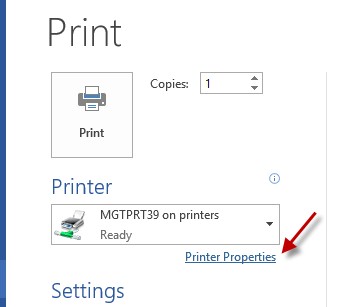
1. Go to File, Print, then click Printer Properties.
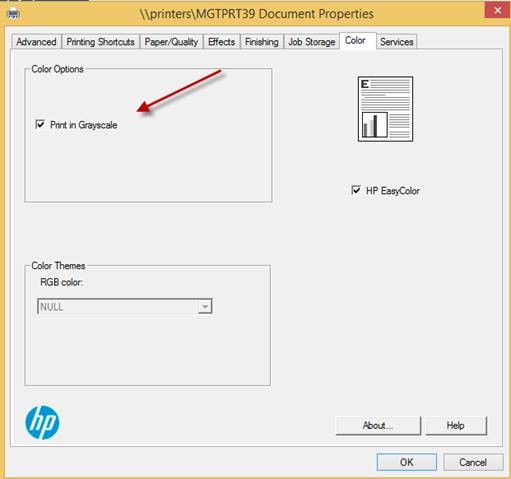
2. Go to Color, then uncheck “Print in Grayscale” option, click OK to exit window.
For additional questions, contact the MGT Help Desk, 452-3465.